
The observability bill
OTEL instrumentation and the OTLP protocol are free. Somewhere on the way to the backend, that changed: per-seat pricing, ingest quotas, gigabytes of RAM to self-host the usual suspects, a collector pipeline that needs its own team. And the meter runs hardest where telemetry is loudest and least looked at: CI runs, PR environments, dev and test clusters. Every build ships a flood of spans nobody reads, and the bill lands anyway. You wanted traces from your test namespace, not a vendor relationship. The industry's answer is a race to the same finish line: same backend, two times cheaper, three times faster, better compression. Fractional gains on the same shape. OTELite is not in that race; it is disposable instead.
Sentry errors
Sentry is the right tool for prod and preprod. Test and CI runs either fill the issue stream with garbage or get no Sentry at all, because a real instance per run means Kafka, ClickHouse, and Postgres per CI job. OTELite takes the error events as files on the same port, grouped by exception kind, next to the traces and logs from the same run. No transactions, no replays, no issue workflow, nothing but the errors.
How it works
- Point your OTEL SDK or collector at OTELite, OTLP/HTTP on port 4318.
- Traces and metrics land in one SQLite file you SELECT from. Logs land as JSONL files you grep. No new query languages: SQL and grep are the query languages.
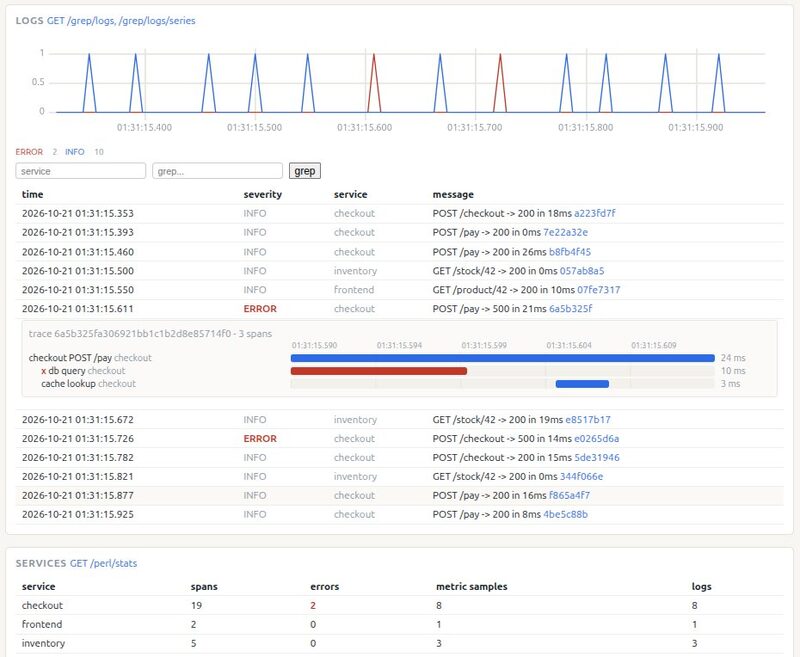
- Open the single page at http://localhost:4318/, pick a time range, and see traces, metrics, and logs together. Filter logs by service, severity, or a grep string; click any line to jump to its trace; pick metrics and they chart on a shared range.
The files are the API. Your data stays in a directory you own.
Your first span is one curl
Start otelite (curl -fsSL https://otelite.io/install.sh | bash, or python3 otelite-*.pyz from the releases page), paste this, and the span is on the page:
curl -s -X POST localhost:4318/v1/traces \
  -H 'Content-Type: application/json' -d @- <<EOF
{"resourceSpans":[{"resource":{"attributes":[{"key":"service.name","value":{"stringValue":"curl"}}]},
 "scopeSpans":[{"spans":[{"traceId":"5b8efff798038103d269b633813fc60c","spanId":"eee19b7ec3c1b174",
 "name":"hello from curl","startTimeUnixNano":"$(( $(date +%s%N) - 150000000 ))","endTimeUnixNano":"$(date +%s%N)"}]}]}]}
EOF
Open http://localhost:4318/: a 150 ms bar with your name on it, already there.
Your first error is one curl too
The Sentry endpoints take plain JSON on the same port: no SDK, no envelope, no key worth checking.
curl -s -X POST localhost:4318/api/42/store/ \
  -H 'Content-Type: application/json' -d '{
  "event_id": "5b8efff798038103d269b633813fc60c",
  "timestamp": "'$(date -Iseconds)'",
  "level": "error",
  "exception": {"values": [{"type": "DemoError", "value": "hello from curl"}]}
}'
The answer is {"id":"5b8efff798038103d269b633813fc60c"}, and the error is on the page, grouped under DemoError next to your span's logs.
The files are the API
otelite.sqlite holds traces and metrics: a spans table (ids, service, times, and status as columns; attributes, events, and links as JSON), and a samples table (ms timestamp, metric, label set, service, value) with small dictionary tables for metric names and label sets. logs/<day>/<service>.jsonl holds one flattened record per line:
{"time_unix_nano":1729328732051000000,"severity_text":"ERROR",
 "body":"POST /pay -> 500 in 21ms","service_name":"checkout",
 "trace_id":"5b8efff798038103d269b633813fc60c","span_id":"eee19b7ec3c1b174"}
Sealing is a rename: stop the process, keep the directory as otelite-2026-10-21/, start a fresh one. A CI run can upload just that directory as its artifact. The DDL, notes included, is src/otelite/db.py.
Protocol notes
- OTLP/HTTP with JSON bodies on port 4318. gzip accepted. 200 {} means accepted; a full queue answers 429 with Retry-After and the SDK retries.
- gRPC on 4317 is not supported. Point SDKs and the collector at http://localhost:4318.
- Binary protobuf is later. JSON is the protocol here.
- Sentry error events ride the same port: store and envelope endpoints under /api/<project>/, any project id, any key, nothing verified. Errors land as JSONL files next to the logs and group by exception kind on the page.
Small on purpose
OTELite is the disposable OTEL backend. Nothing here is built to last, and that is the feature:
- No alerts, no dashboards-as-product, no retention machinery, no high availability.
- Eventual consistency, garage grade: the 200 arrives before the write, and the page catches up in milliseconds.
- Ingest spike: over capacity you get 429 with Retry-After, SDKs retry, nothing is silently dropped.
- No fsync. If it dies, it dies, and you start a new instance in seconds.
- When an instance grows too big: seal it, keep it as history, spawn a fresh one.
Where it fits
One OTELite per namespace, per environment, per CI run. Filtering is done by pointing the right exporters at it, not by building query languages. Spin one up for the tests, delete the machines, keep the data directory for inspection.
On a server, in CI
The binary does not care where it runs. Start the same zipapp on a test box or as a CI service and point both kinds of exporters at it: OTEL_EXPORTER_OTLP_ENDPOINT=http://otelite:4318 for OTEL SDKs and the collector, SENTRY_DSN=http://mykey@otelite:4318/42 for Sentry SDKs. Keep the data directory as the artifact you inspect after the run. A Dockerfile and a docker-compose sample ship in the repo, plain HTTP on a dev network, an SSH tunnel does for the page.